Diaboyos I know it's probably right in front of me but I can't find it. I'm looking for the option to be able to use the Blu-Ray menu controls. In other words the arrows and Enter key since you can't just click on the option you want from the menu you have to use the arrows and then Enter from the controls. Can someone tell me where to access and enable the Blu-Ray controls? Thx!
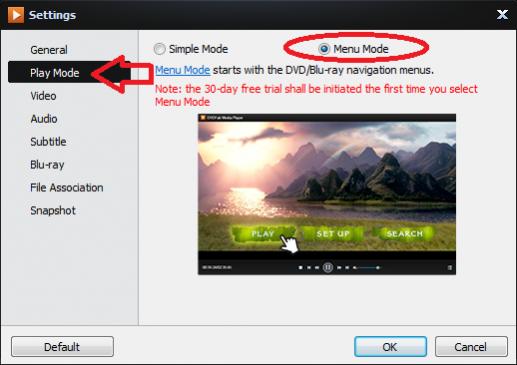
signals Open Player, press F5, the screen below will appear. Click on Play Mode, then select Simple or Menu.
Diaboyos I changed it to Menu Mode because I do want to be able to see the menu but if that's supposed to make the Menu options clickable with the cursor it doesn't work with every movie. I've tried several and it seems to be about a 50/50 chance that it works or not. Are actual controls going to be added at a later date? Thx!
Diaboyos [QUOTE=signals;179687]Most BDs do not support mouse-clickable menus[/QUOTE] That's exactly my point. So until arrow buttons and an Enter button are added for Menu support this will not be a viable BD player solution for people that wish to be able to browse the menu options and not just view the main movie. This is the Pro version as well so it's not just the free version missing this much-needed feature. Attached is a screenshot of Nero's Blu-Ray controls. We need something like that here. Please pass on to whoever is in charge of this that we need controls to be able to utilize the menu screen. Thx.
signals The menus can be navigated with the keyboard arrow buttons and the Enter key with no problem. Perfectly viable for most users.
Diaboyos Are there any plans to add on-screen controls in the future? Keyboard controls are OK for most users but what about the rest of us? I'm in a totally separate room from the computer when I watch movies so keyboard controls don't help me in the slightest. We need on-screen controls like every other software player has. Please pass this suggestion along to whoever has control over this. Thank you.