@3dman7
Really big thanks for all this information it's helping us a lot !
Can you please tell us the brand of your GTX 1060 ?
It's a Zotac and comparing your dads and my fab check files mine says the same for card detect info.cuda and lighting shrink checked marked work fine note we have different processors mine is 3773 and has quick sync and your OS is different for the fab check mine is on top yours on bottom taken from the fab check logs for your dads and mine gtx1060 cards.
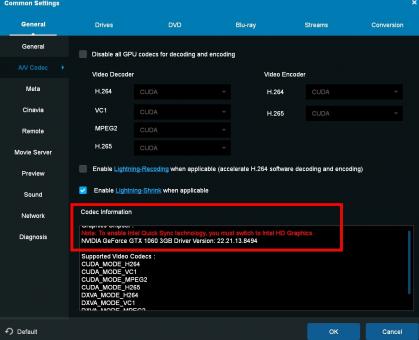
Also if your dad has quick sync in the post with the screen shots you posted you will see what your dad can use on the codex page of fab the box on the bottom it tells you what you can use with fab it has a scroll bar that you have pulled down in the screen shot you posted pull it up to see if quick sync is listed in that bottom box with the scroll bar up all the way if it has quick sync it will tell you to plug your monitor into the computers motherboard to get it to work with quick sync.(see screen shot)
For cuda your monitor should be hooked up to the cuda card as it seems dads speeds are not correct make sure this is correct.Tell your dad to change out the hdmi wire to see if the cable ends are damaged and if possible to use 3.0 hdmi if he can for the drive.The wire with the special ends can be brought on line they often get pulled on and damaged.You can also try plugging into a different 2.0 plug on the computer they also get damaged easy.If using a hdmi extender try plugging the drive directly into the computer.
DetectVideoCard_CUDA: bestCudaDetectInfo 1,0,196819,6,1,GeForce GTX 1060 3GB, os 18
12:26:26:271 info: fab_check::check_cuda: cudaStatus = 0 , modeType = 504
DetectVideoCard_CUDA: bestCudaDetectInfo 1,0,196819,6,1,GeForce GTX 1060 3GB, os 18
12:00:38:849 info: fab_check::check_cuda: cudaStatus = 0 , modeType = 504

